New features include updated Adobe Document Generation add-in for Word, new playground demo, and Liquid Mode documents.
While many of you may be unpacking some of the updates we released in June, we have some significant new updates for Adobe Document Generation in our July release we are excited to share. These updates provide easier ways for you to play around with Adobe Document Generation, get started, as well as helpful tools for Adobe Sign users.
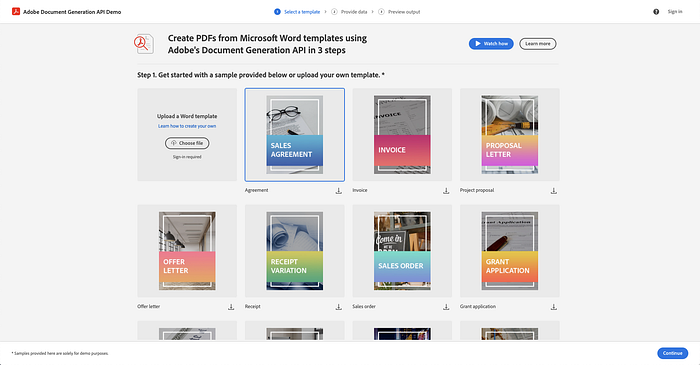
NEW: Adobe Document Generation playground site
Been interested in Adobe Document Generation but haven’t had time to download the SDK and give it a try? No worries. There is now a demo site you can give it a try. The website allows you to:
- See how Adobe Document Generation works with pre-created templates and JSON data.
- Upload your own Word documents and JSON data to test out the templates you have created without installing the SDK on your computer.
- Download sample templates and code so that you can more easily learn to use, tag, and test Adobe Document Generation.
The playground is easy for anyone to use. Give it a try.
Automate Document Generation | Contract Generation - Adobe Developers
Why Document Generation API? Use our Adobe Document Generation Tagger Word add-in to quickly build custom branded…
developer.adobe.com
UPDATED: Adobe Document Generation Tagger for Microsoft Word
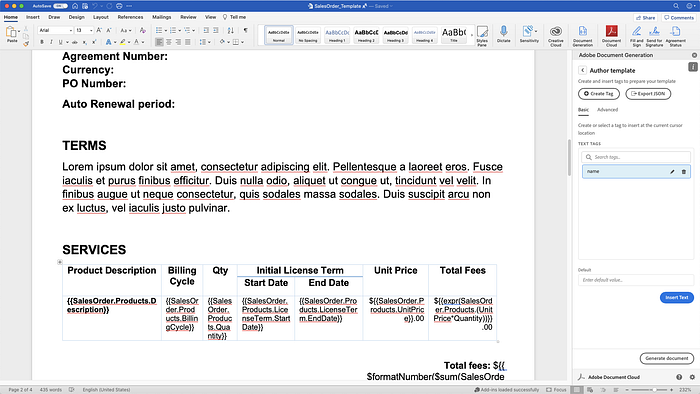
We released the first version of Adobe Document Generation Tagger in March, which allows you to easily tag your Word templates to use with Adobe Document Generation. Designers of the templates do not need to know how to use any code; they can simply use a JSON sample file they get from their developer, import it, and place tags into a Word template.
This release, which is automatically updated for all current users, has several new requested features that will make it easier to create and tag your templates.
If you haven’t tried the Adobe Document Generation Tagger already, install it from Microsoft AppSource.
Tag documents without having a JSON template and export
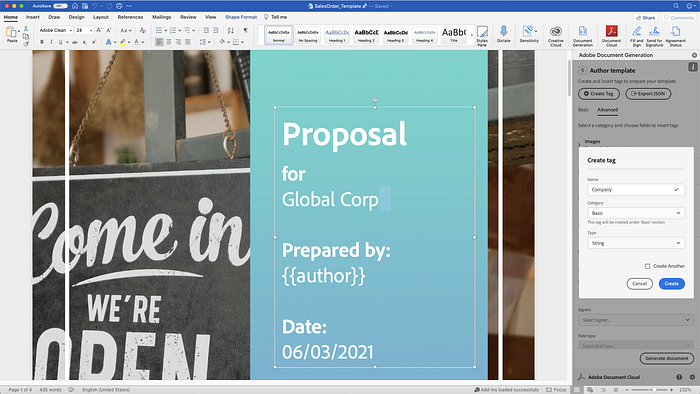
We heard many want to be able to tag a document without needing a JSON sample file. Many want to be able to create a schema for the template they can then pass to their developers.
You can now create your own schema of tags for you to use. When you launch Adobe Document Generation add-in, you click Continue without JSON data.
You can then click Create tag to create your tag, give it a category, object type (String, Number Object). This makes it easy for you to create the schema.
Get Ben Vanderberg’s stories in your inbox
Join Medium for free to get updates from this writer.
Remember me for faster sign in
Once you are done creating your different tags, you can click Export JSON to export a file which you can share with your developer, or you can save it for you to re-use to tag another document.
Preview generate your document
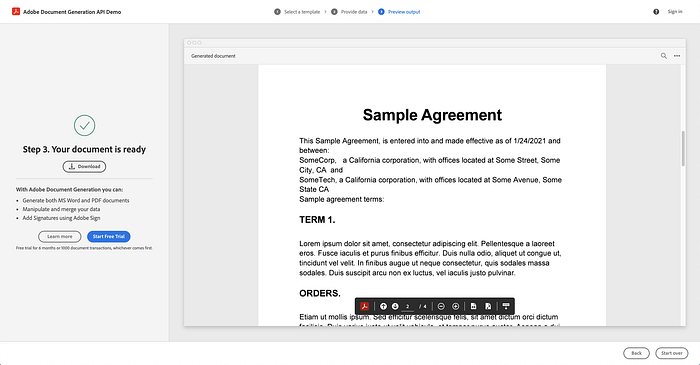
With your sample JSON data, you can now preview your generated document directly from within the add-in. Once you are ready to see a preview, click on Generate document. This will prompt you to login with your Adobe ID. Your file and the JSON data will be uploaded to the service, and it will provide a preview in your web browser of the generated document. This makes it much easier for designers to create and test templates using sample data.
You can also try some of the sample documents available for download from the Adobe Document Generation playground to test yourself.
Adobe Sign users can tag text tags without a schema
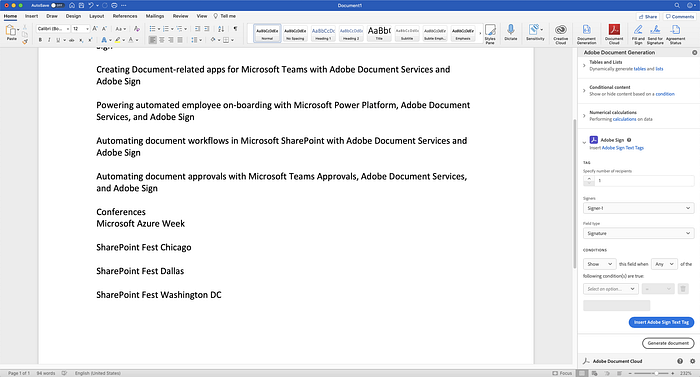
Adobe Document Generation Tagger has had support for you to add Adobe Sign tags to your templates. For current users of Adobe Sign, you can now tag your documents with Adobe Sign text tags without having to have a JSON schema.
- Start the Adobe Document Generation add-in in Microsoft Word.
- Click Get Started.
- Click Continue without JSON data.
- Click Advanced.
- Expand out Adobe Sign.
You will then be able to set your recipients, select which tags you want to insert, and even now add conditions to your tags (such as visibility).
Final Thoughts
Adobe Document Generation’s mission is to empower everyone to help automate their document creation as developers and citizen developers. These new improvements make it easier than ever to try Adobe Document Generation and easily create your document templates.
You can give Adobe Document Generation a try as part of Adobe PDF Services API for free as a trial. If you are a citizen developer, Adobe PDF Services are available as part of our Microsoft Power Automate connector. Also, check out some of our blog posts that are great tutorials to learn more about Adobe Document Generation.
Related Articles
Unpacking June 2021 Release: Adobe Document Services
New features in Adobe Document Services APIs allow you to generate documents from Microsoft Power Automate and extract…
medium.com
Hands-On with Adobe Document Generation in Microsoft Power Automate
Learn how to dynamically generating Word or PDF documents simply using Adobe Document Generation actions in Microsoft…
medium.com
Generating and Protecting Invoices with Adobe Document Generation and PDF Services
Things get even more interesting when you start looking at how our various APIs can work together to enable more…
medium.com
Formatting Tips and Tricks for Adobe Document Generation API
Adobe Document Generation API service provides an easy-to-use API for generating PDFs and Microsoft Word docs based on…
medium.com