
New services from Adobe Document Services APIs enable developers to easily integrate PDF functions into their applications.
Just about any person with a computer has interacted with a PDF at some point in their life. Whether it’s in an attachment in their email, downloading a form from a website, or even getting copies of your tax returns. It’s really the “lingua franca,” or common language for everyone to be able to share a document and have it look exactly as you intended when your provide it to another person.
In today’s world, while there are many apps and libraries that exist to create or view PDFs, they are not created equal. Some might generate a PDF that almost looks like the original but loses the fidelity of the content. There are some libraries that may provide an ability to view PDFs, but the viewing experience is sub-par. Existing libraries may exist, however they can be difficult to use and might require server-side code in a world becoming more cloud-based.
Today, Adobe announced our new Adobe PDF Embed API and PDF Services API. These are new services that allow you to integrate PDF viewing experiences into your apps with just a few lines of code, as well as create PDFs, combine them together, or export them into different formats. There is a lot to unpack, so here are some of the key developer benefits to take away.
PDF Embed API
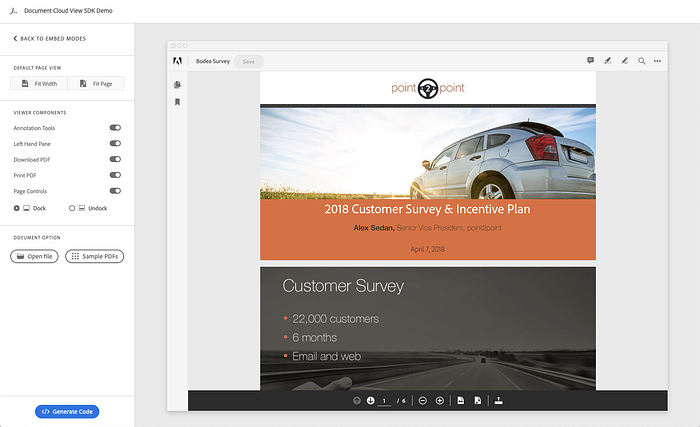
Adobe PDF Embed API allows you to easily embed PDFs into your website or app with just a few lines of JavaScript. Adobe PDF Embed API is a client-side viewer, meaning that it is easy for you to display PDFs hosted on your own websites, even if they are behind a secure wall; Adobe PDF Embed API renders the PDFs as HTML. It is entirely free and available on Adobe.io for any app to use. Here are some of the key features:
Multiple embed modes
View PDFs in different modes, such as Full-Window, Fixed-Container, or In-Line.
Search
Perform inline PDF search.
Annotations
Allow viewers to annotate PDFs inline. Add comments, draw, highlight, and strike-through text.
Bookmarks & page views
Any PDFs that are in the source PDF will be automatically available as part of the bookmarks window. All pages are rendered as previews on your left panel to quickly navigate documents.
Event listeners
Adobe PDF Embed API viewing experience can be extended or events can be tracked using event listeners. With just a few lines of code, you can add behaviors based on when a viewer:
- Opens the document
- Views a specific page
- Clicks a bookmark
- Downloads a PDF copy
- Prints a PDF
- Opens a hyperlink
- Copies text to their clipboard
- Searches for a certain bit of text
- Changes the zoom level
All of the event listeners have benefits that allow you to either extend the user experience based on those events, or provide analytics on how they interacted with the PDFs.
If you want to learn more, see the walkthrough on how to get started with the Adobe PDF Embed API, or check out the interactive demo available on Adobe.io or read our recent blog on how to started.
Analytics
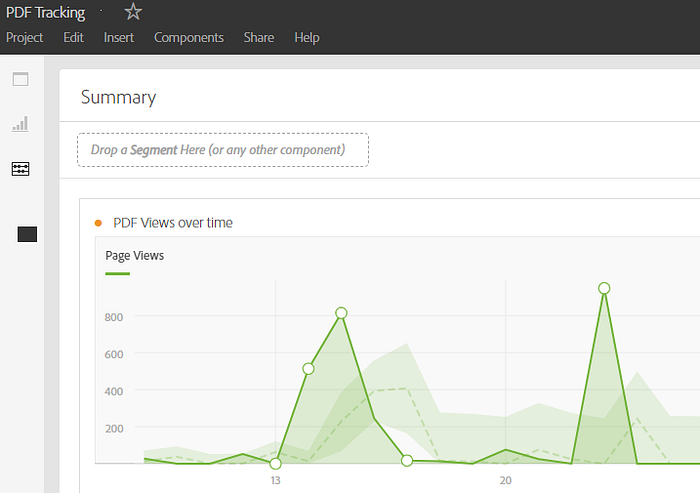
One of the other benefits that come from Adobe PDF Embed API is analytics. Many marketers today often have a strong desire to get reading and viewing data for PDFs just like they do with webpages. With Adobe PDF Embed API, you can do just that with its built-in Adobe Analytics integration.
If you don’t have Adobe Analytics, then the event listeners in Adobe PDF Embed API still allow you to get the information and write your own connectors to put them into your BI software.
If you would like to learn more about how to integrate your PDFs with Adobe Analytics, see documentation on how easy it is to connect up with your Report Suites.
Conversational marketing
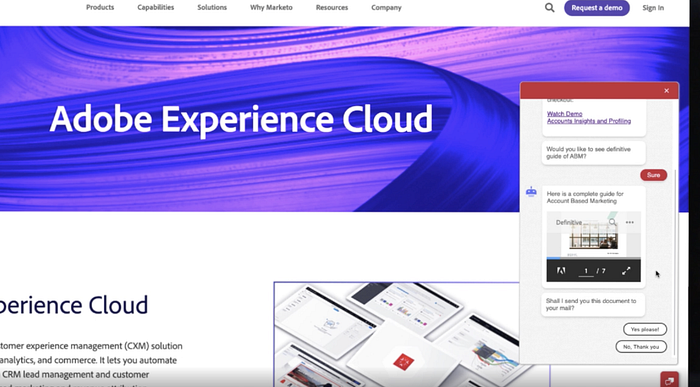
As part of Adobe Summit, we discussed how you can use Adobe Marketo with PDF Embed API to integrate PDF viewing experiences directly into conversational marketing experiences, like a chatbot. Many organizations utilize chatbots to provide easy personal ways to communicate with customers on their websites and apps.
Integrate PDF viewing into your bot conversation
Adobe Marketo is integrating Adobe PDF Embed API into bot conversation experiences, allowing you to easily provide whitepapers and content to visitors in the context of the conversation. For example, let’s say a visitor comes to your website and is greeted by a bot. The visitor is looking for some more information on a topic. The bot can then offer up PDF content for them to view inline.
Trigger retargeting actions based on PDF events
You can also trigger marketing events to trigger based on how users interact with a PDF. For example:
- If someone downloads a PDF, you may want to notify a sales person associated with this contact.
- When someone views a whitepaper, you may want to change a lead status to hot as this customer is very interested.
- When a customer gets to a certain stage in the PDF, then you can trigger a chatbot to present itself to help convert a visitor to a lead, such as prompting them to sign up to a service or book an appointment.
All of the events available as part of Adobe PDF Embed API can be used to trigger actions in Marketo.
PDF Services API
Adobe is now releasing Adobe PDF Services API for PDFs to developers. This means that in scenarios where you need to create a PDF, export it into another format, or combine PDFs into one PDF, you can do that through easy cloud services.
Create PDF
Create PDF allows you to take documents that you have in a variety of formats, such as Word or images, and convert them into a PDF. When the document is converted into PDF, it is automatically optimized and uses Optical Character Recognition to make documents accessible and searchable using Adobe PDF engine.
Get Ben Vanderberg’s stories in your inbox
Join Medium for free to get updates from this writer.
Remember me for faster sign in
In the sample code in GitHub, you can see examples like:
- Create PDF from DOCX Stream
- Create PDF from DOCX to Output Stream
- Create PDF from DOCX File
- Create a PDF from Dynamic HTML
- Create a PDF from Static HTML
- Create a PDF from PPTX
Convert HTML to PDF
One of the other benefits of Create PDF is that it allows you to convert HTML into PDF. The sources of this PDF can either be local or based on an accessible URL. This can be very useful when you are trying to snapshot what a website looked like during a period of time (like your own wayback machine).
With many PDF renderers, this can generate mixed results when converting HTML to PDF or require a lot of XSL-FO magic. When using Create PDF, it renders the HTML along with its CSS and JavaScript. This means to create logic, to add and remove sections, how to style, etc., you can use the skills you already have with HTML, JavaScript, and CSS to create PDFs. Think of it like create an SPA (single-page app) for PDF.
There are a number of scenarios where this can become very useful:
- If you need to assemble a terms and conditions PDF from HTML hosted on your website.
- If you need to create a quote summary from your webpage.
- Sometimes the way that you present documents online aren’t as reliable as PDF. Using Create PDF, you can convert a document to PDF and then serve it to your user using PDF Embed API, giving an easy preview engine for a variety of formats.
OCR PDFs: Increase searchability
There are millions of PDFs that have been created by scans or by systems that do not make searchable PDFs. With Create PDF, you can optimize your old unsearchable PDFs and make them searchable. This has a number of benefits:
- Use Create PDF with your automation or RPA services to take old PDFs and make them searchable.
- Take PDFs that were created in another application that were not ideally searchable and optimize them to be readable by repositories like SharePoint, Dropbox, BOX, etc.
Incorporating this OCR into your code is extremely simple. Here is a snippet of incorporating OCR in Node:
Export PDF
Export PDF allows you to take a PDF and convert it into a format such as a Word document or an image. There are a few key benefits of where this can come into play:
- Many enterprise applications provide easy export of content or data as PDFs like quotes, contracts, manuals, etc., but not to formats like Microsoft Word. Using this API, you could take the output PDF from another system and easily convert it into Word as a reusable and editable document.
- Sometimes you lose the source document for a PDF and you want to convert it back into an editable format like Word. This would allow you to do that easily and expose that functionality within your app.
Here is an example in Node:
Combine PDF
When I am searching for content on a web page, I may need to download a lot of different PDFs, which can be unmanageable. Instead, using the Combine PDF API, you can take all the PDFs and combine them into one easily manageable PDF for someone to download.
Combine pages also allows you to select which pages you are combining, which means you can choose only the specific pages that are necessary for the new PDF.
Some examples where this can be a benefit:
- Compiling a number of documents to provide a personalized proposal to a customer online
- Instead of having to navigate to multiple PDFs and pages, use your visitor data to assemble content into one viewing experience that is seamless.
Conclusion
There are a wealth of different services now available as part of Adobe Document Cloud. Whether it is an online web-app, an RPA tool, or workflow solution, Adobe PDF Services API offers a variety of easy API to allow you to automate and create the best PDF experiences.
We’d love to hear from you and get your feedback and experience. Please open the conversation, reply to the post, or reach out to me @benvanderberg on Twitter.
EDITOR UPDATE (6/11/2021): Updated names of APIs to reflect new branding Adobe PDF Embed API and Adobe PDF Services API.