
2021 was the year that people stepped back and realized that the changes that we made in 2020 are here to stay. Organizations are now looking for ways to institutionalize the new normal. Part of the new normal is a paper-free digital-first business.
Adobe Acrobat, Adobe Acrobat Sign, and Adobe Document Services APIs have played a significant role in helping people adapt quickly. Tools like Adobe Scan allow people scan their COVID vaccine cards safely to show proof of vaccination. Adobe Acrobat for Microsoft Teams has enabled teams to collaborate and annotate on PDF documents without leaving Microsoft Teams. Along with that, Adobe Document Services has helped enable document and PDF automation through APIs and connectors into tools like Microsoft Power Automate.

So as we look forward to some of the exciting things coming in 2022, let’s recap some of the incredible innovations that have helped make 2021 a spotlight on how Adobe is helping drive innovation with the modern hybrid workplace.
Adobe PDF Extract API, released in March 2021, allows you to take PDF documents and turn them into JSON that apps can easily parse. While some services provide the ability to create and read PDF documents, one common issue is the ability to understand the structure of PDF documents such as paragraphs, tables, and lists to be easily parsed and placed into other systems. There are several ways Adobe PDF Extract API is helping drive document automation:
- Contract management analysis — Evisort, a contract management platform, uses Adobe PDF Extract API to help drive their AI-power contract analysis.
- Extracting exam questions from old tests — Cambridge Assessments utilizes PDF Extract API to extract old exam questions so they can be reused, saving over 2,000 days of labor for every 50,000 questions that would have required manual entry.
- Forms analysis — AFTIA Solutions used PDF Extract API to understand better where repeating elements existed across their customer’s forms, saving thousands of hours of manual review.
- Deep PDF Intelligence with Natural Language Processing (NLP) — PDF Extract API can work with NLP tools to more easily gain insights into content in PDF files.
We had the great opportunity to share some of these tools at Adobe Developers Live. A complete list of all the other excellent presentations can be viewed here. Also, check out:
- Digging Out Data with Adobe PDF Extract API
- Adobe PDF Extract: API Output Demystified
Data-driven document personalization
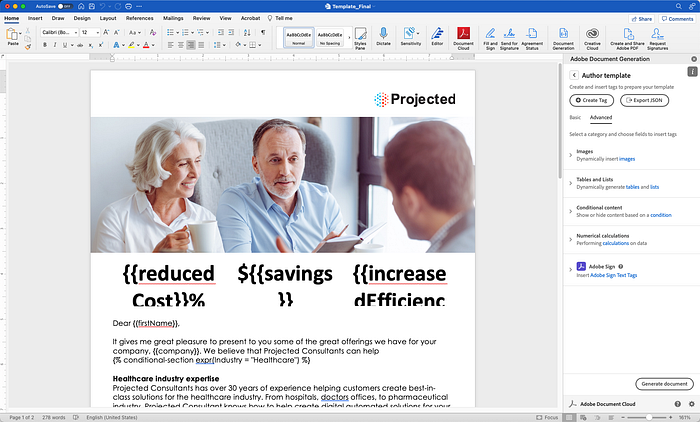
In March 2021, we launched Adobe Document Generation API, an API that allows you to take templates built with Microsoft Word and merge it with JSON data from your system of record. Document Generation templates are designed using the Document Generation Tagger in Microsoft Word to set things like Conditional Sections, variable-length tables, and tags for electronic signature using solutions like Adobe Sign.
Throughout the year, we also added additional features, including:
- SDKs for your platform — Release of Adobe Document Generation API available across REST API and several SDKs including NodeJS, Java, Python, and .NET.
- Data merging — Ability to add text tags, images, tables, lists, conditional sections, numerical calculations, and Adobe Sign tags directly within your Microsoft Word documents using Document Generation Tagger.
- No-code schema builder — Build your template schema using Adobe Document Generation Tagger through an easy no-code interface so that a JSON schema can be shared easily with a developer. This article helps highlight how you can get started.
- Data-driven styling — Add styling information so that you can dynamically change styling information inline in your JSON data.
- SVG support — Dynamic charts and images can now be passed inline into documents using SVG content and JPEG, PNG, and other formats.
- Dynamic Tables — Dynamically add table rows based on data content. You can also support the dynamic addition of columns.
- Preview and templates — You can now preview your documents generated in Microsoft Word directly without leaving Word, making it easy for designers to create and preview with data. Several templates are available to learn and get started.
More availability through low-code development
Business challenges with PDFs and digital documents aren’t just certain users, they are used by and affect everyone. For this reason, we have focused on providing ways better to automate document workflows through the business process applications people already leverage, such as:
- Microsoft Power Platform integration — We added connectors for Microsoft Power Automate with Adobe PDF Services to create PDF documents, generate documents from data using Adobe Document Generation API, secured or combined with other PDFs, processed with optical character recognition (OCR), and sent for signature using Adobe Sign.
- Easy templates in Microsoft Power Automate — Created templates for Microsoft Power Automate so you can quickly start using Adobe PDF Services within your document workflows and other parts of Microsoft 365 and Microsoft Power Platform, such as creating PDFs from bots.
- Workfront Fusion connector — Added connectors in Adobe Workfront Fusion so that connectors can now use Adobe Document Generation API, PDF Services API, and PDF Extract API directly within your workflows built-in Workfront Fusion.
We have several sessions to help you learn more about using Adobe PDF Services and Adobe Sign with Microsoft Power Platform. Some additional resources include:
- Generate Documents and Send in Bulk for Signature in Microsoft Power Automate
- Why You Should Use Adobe Document Generation API with Adobe Sign
- Get a Document Generated and E-Signed Using a Chatbot
- Hands-On with Adobe Document Generation in Microsoft Power Automate
Embedded PDF content and forms in web platforms
With hybrid work environments, people are creating more PDFs than ever, and there is more expectation of these PDFs being embedded into apps and products that they use every day. To help them, we have provided several ways for users to interact with PDF content:
- Embedded Web Forms — Acrobat Sign Web Forms allow for easy embedding of forms on web pages that can be routed to the appropriate parties for e-signatures.
- Better PDF viewing experiences — Adobe PDF Embed API makes it easier than ever to display PDF content in line with other HTML content. We have made that even more interactive and performant with support for linearized PDFs, additional annotation features like text annotations, and improved search engine optimization.
- Adobe Acrobat for Microsoft Teams added support to annotate and review PDFs inline within your Microsoft Teams conversations. Adobe Acrobat for SharePoint and OneDrive now adds the ability to edit and review your PDFs within those apps.
There are great articles to learn how to improve reading experiences, in addition, some more resources such as:
- Tips and Tricks for Working with Adobe PDF Embed API
- Deploying Adobe PDF Embed API with Adobe Experience Platform Launch
Accelerating business workflows with Adobe Acrobat Sign
Adobe Acrobat Sign (formerly Adobe Sign) has been for years helping transform and speed business workflows with secure and straightforward e‑signatures with the power of Adobe Acrobat. It’s trusted by Fortune 500 companies and is Microsoft’s preferred e‑signature solution, with transparent pricing.
Get Ben Vanderberg’s stories in your inbox
Join Medium for free to get updates from this writer.
Remember me for faster sign in
This year, there were several innovations that we built to help drive even more ways that businesses can streamline their business workflows:
- Notarization integration — In partnership with Notarize, Inc’s Remote Online Notarization (RON) platform, Acrobat Sign can add a remote online notarization service as part of their Acrobat Sign transactions.
- Sandbox functionality — Enterprise customers can now purchase sandbox environments to test templates, customer workflows, APIs, and more.
- Liquid Mode Signing — Liquid Mode signing experience, which allows you to great a mobile-optimized signing experience, is now available for Web Forms as well as agreements
- More Trust Service Providers — To offer our customers the ability to meet their most highest-level international signer identity requirements, we added more Trust Service Providers for Advanced and Qualified Signatures, including Cleverbase, PrimeSign, Sectigo, Aadhaar, and TrustPro.
- Users in Multiple Groups — Adobe Acrobat Sign is used across enterprises and requires enterprise-level deployment and provisioning. Users in Multiple Groups give administrators the ability to easily set different permissions to employees in multiple parts of the organization.
- Capturing e-Signatures with Microsoft Teams Approvals — Adobe Acrobat Sign is now built into Microsoft Teams so that you can send documents for e-signature within an Approvals workflow.
- Multi-Signer Web Forms — Edit Web Forms and Counter-Signers
Additional articles:
- Store Form Data from Adobe Acrobat Sign in a Microsoft Dataverse Record
- Automate Your Online Application Process with Adobe Sign Web Forms and Microsoft 365
More Ways to Learn
This past year we launched more ways for you to learn how to get the most out of our services:
- Adobe Tech Blog — Adobe Tech Blog provides a great set of blogs to learn how to get the most out of our APIs and services.
- Paper Clips monthly live stream — Monthly Livestream to learn how to get the most out of Adobe Document Services.
- Adobe Experience League — Provides several tutorials to get started using APIs.
- Templates in Microsoft Power Automate — Starter templates to start using Adobe PDF Services and Adobe Sign.
- Developer Resources — Resources to help you get started with Adobe Document Services
- Acrobat Sign Resources —Learn more about how to embed e-signatures into your app?
- Get engaged — Join the community forums to get your questions answered with the user community
The Future
As we roll into 2022, organizations are continuing their journey on creating hybrid work environments and streamlining their businesses to accommodate the new normal. To help with this transition, we will continue to focus on some of these areas we will help continue to deliver document automation services:
- We will continue to provide more ways to automate document actions within Adobe Document Services.
- We will offer additional integrations into applications ecosystems with our partner, Microsoft.
- We will provide more incredible innovations in the areas where Adobe Sensei provides AI-powered innovation, such as those that help power PDF Extract API, Liquid Mode, and others.
There are a lot more innovations coming in 2022, and we look forward to seeing how more of our customers are driving innovation within their own businesses and apps.